AI Tracker is Surfer’s unique tool designed to help you track mentions of your content and brand in responses generated by large language models (LLMs) like ChatGPT, Gemini, Perplexity, and others. It gives you a peek into what sources LLMs use to answer prompts and whether your website is among them.
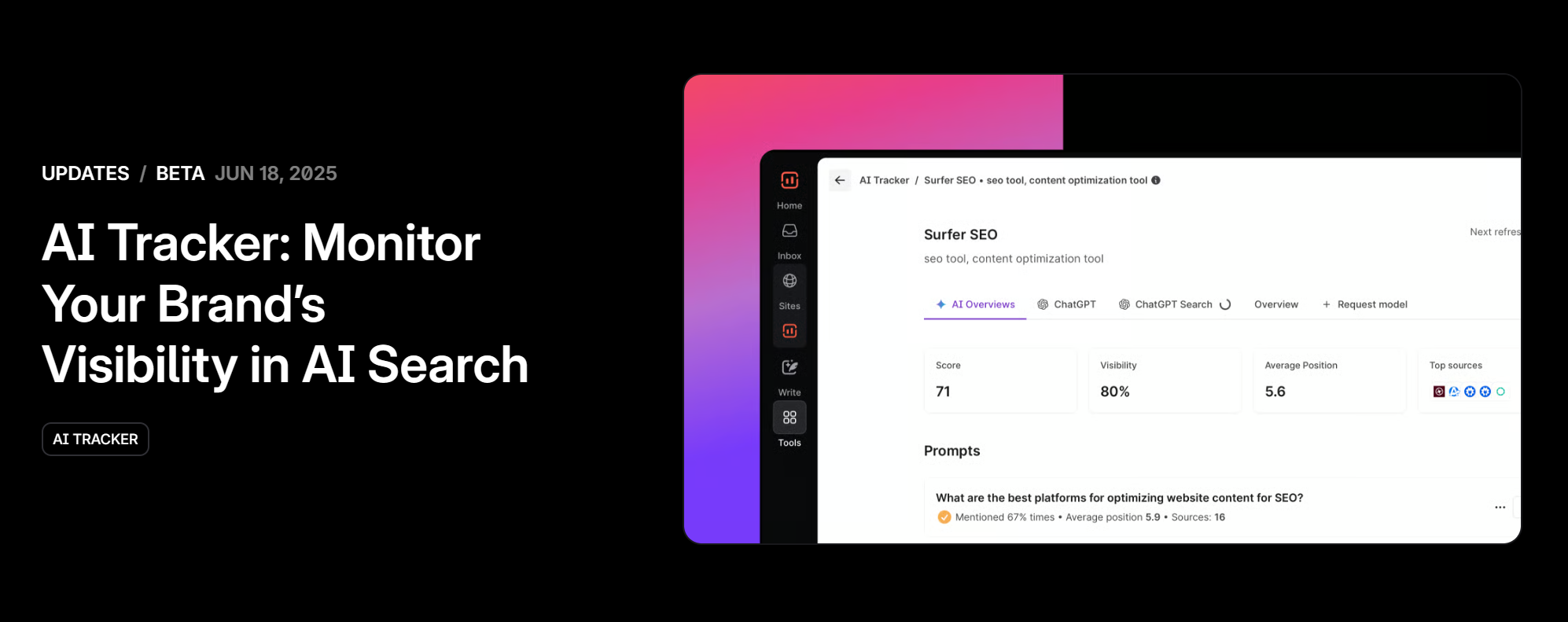

AI Tracker is included in the Standard, Pro, Peace of Mind, and Enterprise plans. You can also get it on its own with the AI Search Analytics plan. It helps you monitor your brand in responses from popular LLMs, evaluate a set of prompts, and identify which domains those prompts cite or reference.
Thanks to AI Tracker, you’ll see:
Which of your pages are mentioned
Which competitors are getting cited
How frequently each domain appears
Insights on prompt-level performance
It’s a powerful way to understand if you're influencing AI-generated answers, and how to improve that influence over time.
We know LLMs don’t always give the same answer, so instead of relying on a single response, we use a self-consistency method that checks for consistent naming and ensures the answers, including sources, align.
We also run the same questions across different models and prompts. By looking at the overlap, we can filter out noise and keep the most reliable. This way, the results have high confidence.
Open AI Visibility in the left menu.
The first time, Surfer analyzes your brand and suggests prompts to track. While that runs, the sidebar shows a loader — hover it and select Check status to see progress.
When the prompts are ready, the loader turns into a Setup badge. Select it to review the prompts and create your project.
Once your project is live, open Recommendations in the left menu. It turns your AI Tracker data into a to-do list: sources to get mentioned on and content to write.
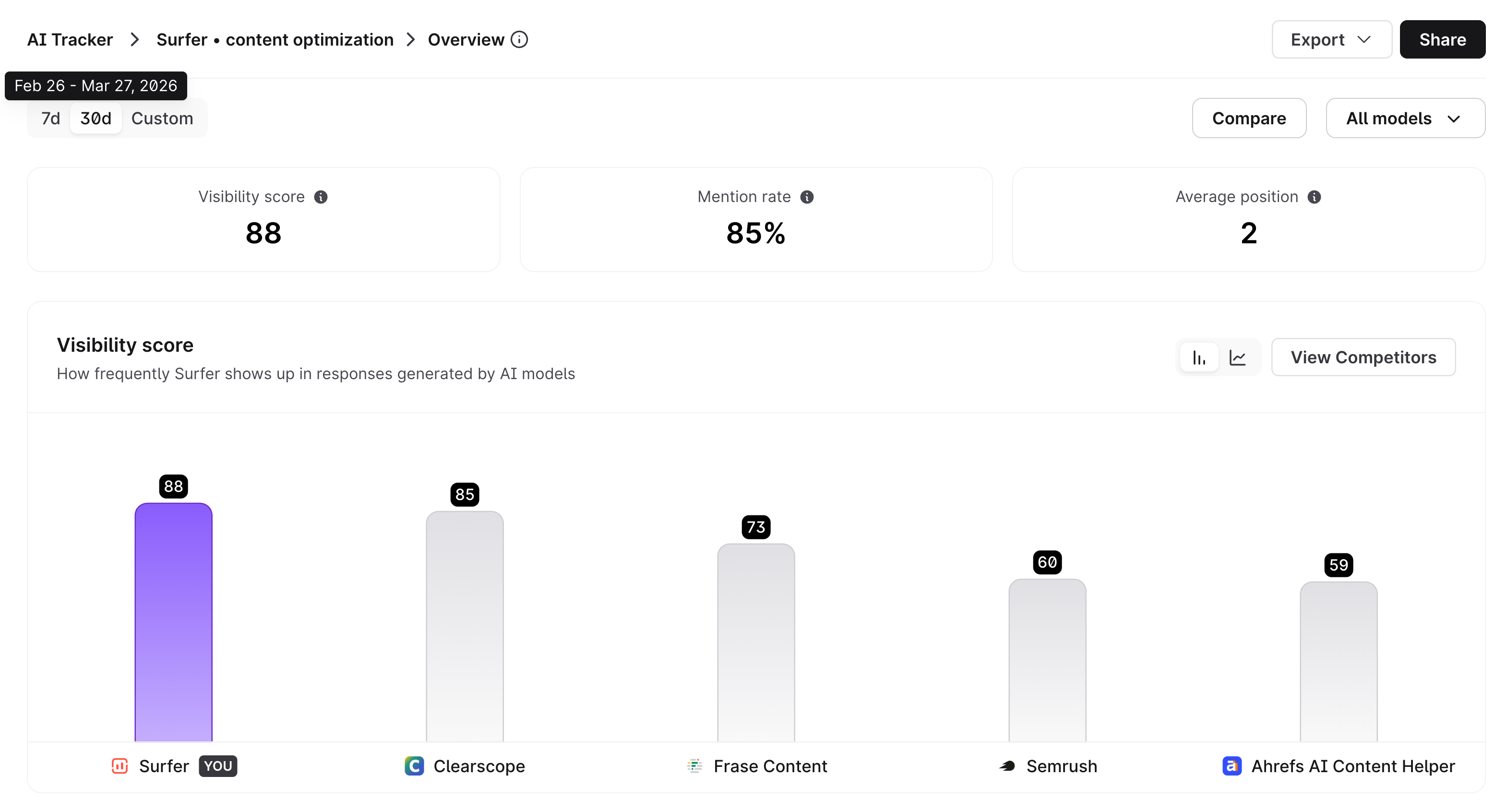
Visibility score – a score that tracks and compares your visibility across prompts and AI models (quality of presence)
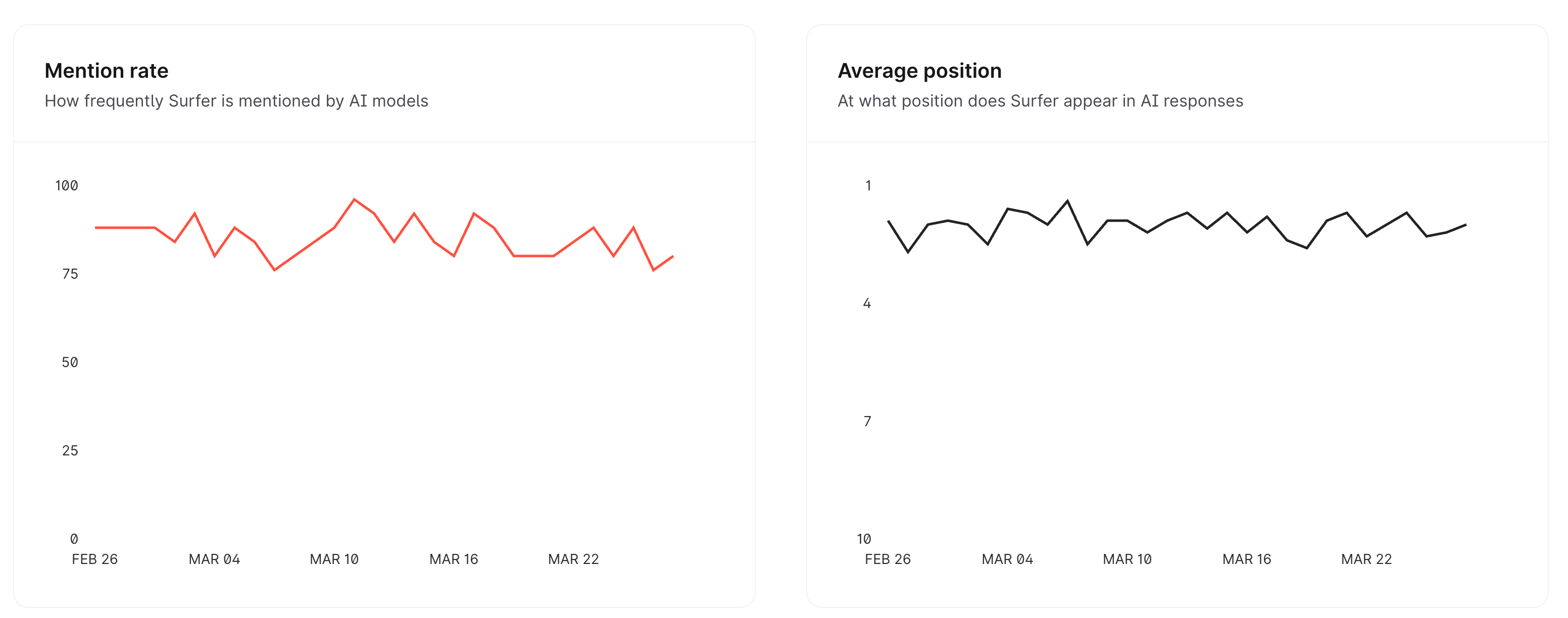
Mention rate – how often AI models mention your domain
Average Position – At what position your brand appears in AI responses
Topics & Prompts - your top performing topics and prompts
Sources - web pages referenced by AI models the most
Your data and charts refresh daily on Pro, Peace of Mind, Enterprise, and AI Search Analytics plans. And it refreshes weekly on the Standard plan.
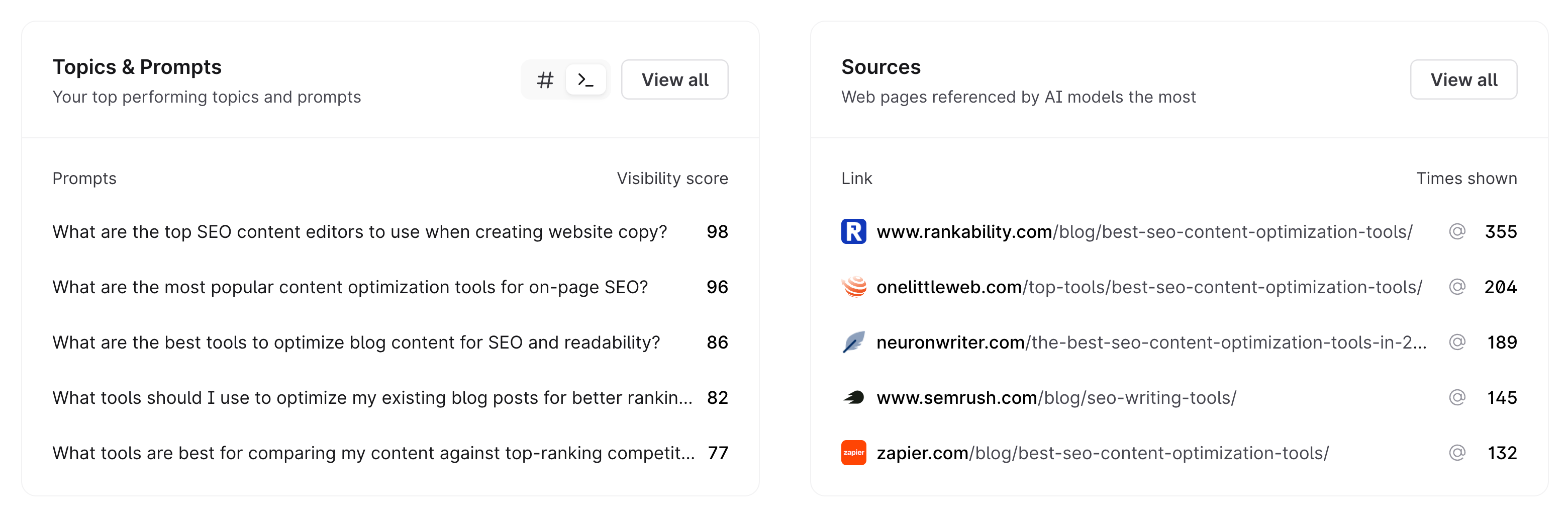

See which sites LLMs trust the most. If platforms like LinkedIn, Reddit, or Quora appear frequently, consider:
Becoming active there
Contributing insightful posts and answers
Partnering with influencers or asking employees to share your content
If certain domains dominate the citations, explore guest posting, partnerships, or even sponsored mentions - this will help you build your domain's authority and a strong external linking network.
Study the top-cited content. What makes it valuable?
Use Content Editor to recreate or outperform similar pages
Pay attention to factual depth using the Facts tab
Match or exceed the coverage of top-performing content
Surfer’s Keyword Research and Topic Explorer tools (especially when connected with GSC) help you:
Discover related content ideas
Fill content gaps that LLMs might be using to source answers
Improve topical authority across a cluster
Track branded keywords in your Site dashboards
Low branded search volume? Time to boost brand-building activities
Secure brand mentions on other websites related to your niche—these are the sources LLMs often train on
Identify the top-mentioned competitors
Study their SEO and content strategies
See what kind of brand presence and citations they are getting
Open any source in the Sources Dashboard to see which brands it mentions and in what sentiment.
Regularly monitor LLM mentions and rankings
Evaluate if your activities are improving visibility
Adjust content and targeting strategies based on your AI Tracker data
You can manage prompts in already created projects — no need to set everything up from scratch!
Add prompts – When you add a new prompt, it will automatically schedule a project refresh to start tracking it.
Remove prompts – Made a mistake or no longer need to track a prompt within your project? You can remove it and free up your limit for new prompts.
Removing a prompt will not trigger a new refresh. Instead, you’ll see an information message that the prompt is no longer being tracked.
If we still have data from the timeframe when the prompt was tracked, it will remain available for review.
💡Important rules:
At least one prompt must always remain in a project.
If you remove all prompts, you need to add at least one new prompt immediately.
Full project removal is not possible from the app — if you want to delete the entire project, please contact our Support team.
AI Tracker turns your data into recommendations. Find them in Recommendations:
Mentions (off-page): highly cited sources where your brand is mentioned negatively, with mixed sentiment, or not at all. Popular sources that don't mention you rank highest. Use this list to plan outreach. In short - you can contact sources from this list to get yourself listed on their website in positive context and improve your AI Visibility.
Content Ideas (on-page): topics to write about to close AI visibility gaps. Each idea comes with a suggested title, so you can open it in the Content Editor and start writing.
When to open Recommendations:
The Recommendations badge lights up
Your Visibility Score or Mention Rate drops on the Overview Dashboard.
Competitors show up in AI answers where you don't.
You're not sure what to write next.
When to expect them:
Off-page recommendations are ready as soon as your project's first report finishes.
On-page recommendations follow 4 days later.
After that, recommendations update every Monday. When new ones are ready, you get an in-app notification and the Recommendations badge lights up.
Focus on specific prompts and LLMs relevant to your niche
Different LLMs may prefer different types of sources (e.g. AIO = LinkedIn, Perplexity = Reddit)
Influencing LLMs takes time and consistency
AI Tracker is your ongoing pulse-check on whether your brand is influencing the new wave of search: AI-generated answers.
AI Tracker is included in:
Standard: 25 prompts, ChatGPT only, weekly refresh
Pro: 50 prompts, daily refresh
Peace of Mind: 100 prompts, daily refresh
Enterprise: custom
AI Search Analytics (AI Tracker only): 50, 100, 200 or unlimited prompts, daily refresh. Learn more
Need more prompts on Standard, Pro or Peace of Mind? Add them in packs of 10 for $18 per month each from the plan selector or at checkout.
To lower your prompt count, contact Support.
Each AI Tracker query can include up to 100 prompts at once. You can exclude prompts if you don’t need to track that many for a specific brand, product, or keyword. This gives you the flexibility to focus only on the most relevant prompts for your goals.
Yes — contact Support and we'll move it with its history. A branded workspace can hold only one AI Tracker project, so if you have several projects for the same brand, specify which one to move.
Reactivating a workspace doesn't restart its AI Tracker project, because your new plan may have a different prompt limit. Reactivate the project from AI Visibility and choose which prompts to keep.